Sending to the Ertzaintza directly from Keyio
Authorise Keyio once on the Ertzaintza website and send bookings and guest reports without uploading files.
How it works
In the Basque Country, bookings (within 24 hours of being made) and guest reports (within 24 hours of check-in) go to the Ertzaintza. Keyio can send both to the Ertzaintza web service for you, signed with the certificate of Tripticode S.L. (tax ID B05654819), the company that runs Keyio — no file to download or upload, and no Ertzaintza password of yours stored anywhere.
The Ertzaintza only accepts it once the establishment titular has authorised Tripticode as a user of that establishment. That is done once, on the Ertzaintza website, with the titular's digital certificate. Until then, and whenever direct sending is not possible, "Download Ertzaintza XML" keeps working as before.
You need: the titular's digital certificate (Izenpe, DNIe, FNMT, Camerfirma, Firma Profesional or Uanataca), Idazki Desktop installed (Izenpe's signing app, linked from the form's first page), and the establishment's Ertzaintza code and tourism register number.
Step 1 — Authorise Keyio on the Ertzaintza website
Open the Ertzaintza "Solicitud de usuarios (Registro Hostelero)" form: ertzaintza.euskadi.eus/wps/portal/ertzaintza/solicitudUsuarios?codAp=RH. The same link and every value to copy are in Keyio, under the property → Edit → Ertzaintza.
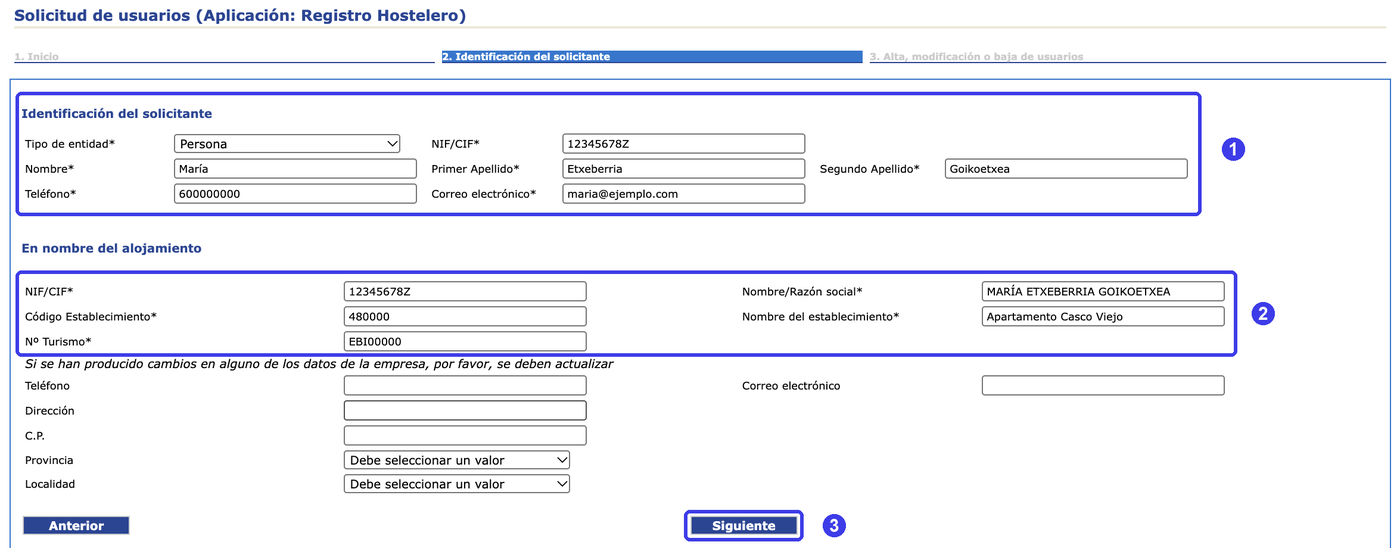
- 1"1. Inicio": click "Siguiente".
- 2"2. Identificación del solicitante" (1): your details — "Persona" or "Empresa", tax ID, name, phone and email.
- 3"En nombre del alojamiento" (2): the establishment as the Ertzaintza has it — the titular's NIF/CIF and name, "Código Establecimiento", establishment name and "Nº Turismo". Then "Siguiente" (3).
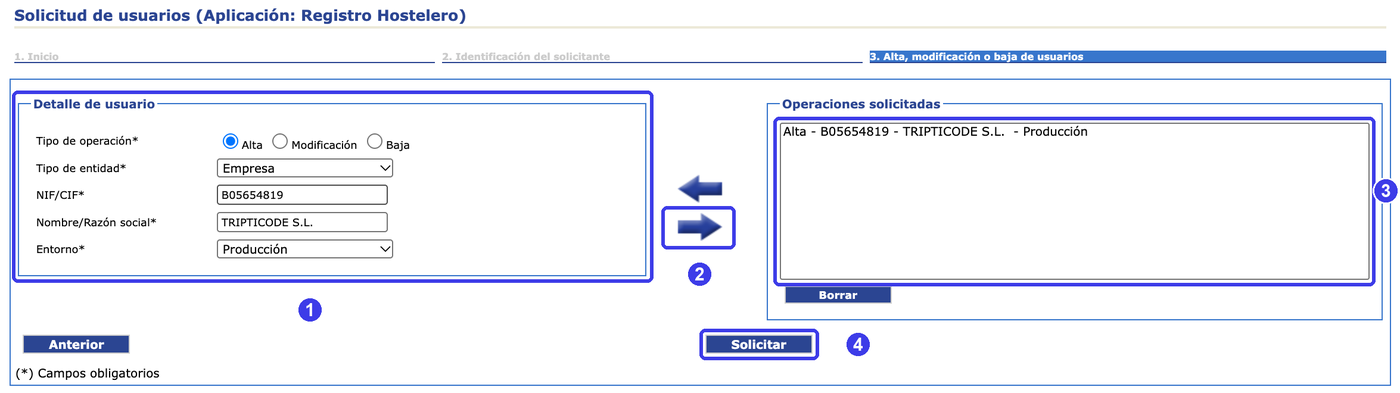
- 4"3. Alta, modificación o baja de usuarios" (1): Tipo de operación "Alta", Tipo de entidad "Empresa", NIF/CIF "B05654819", Nombre/Razón social "TRIPTICODE S.L.", Entorno "Producción".
- 5Click the blue RIGHT arrow (2). This is the step most often missed: without it nothing is requested. "Operaciones solicitadas" (3) must now show "Alta - B05654819 - TRIPTICODE S.L. - Producción".
- 6Click "Solicitar" (4) and sign with your certificate when Idazki Desktop asks. The Ertzaintza approves it within a few days.
Step 2 — Tell Keyio
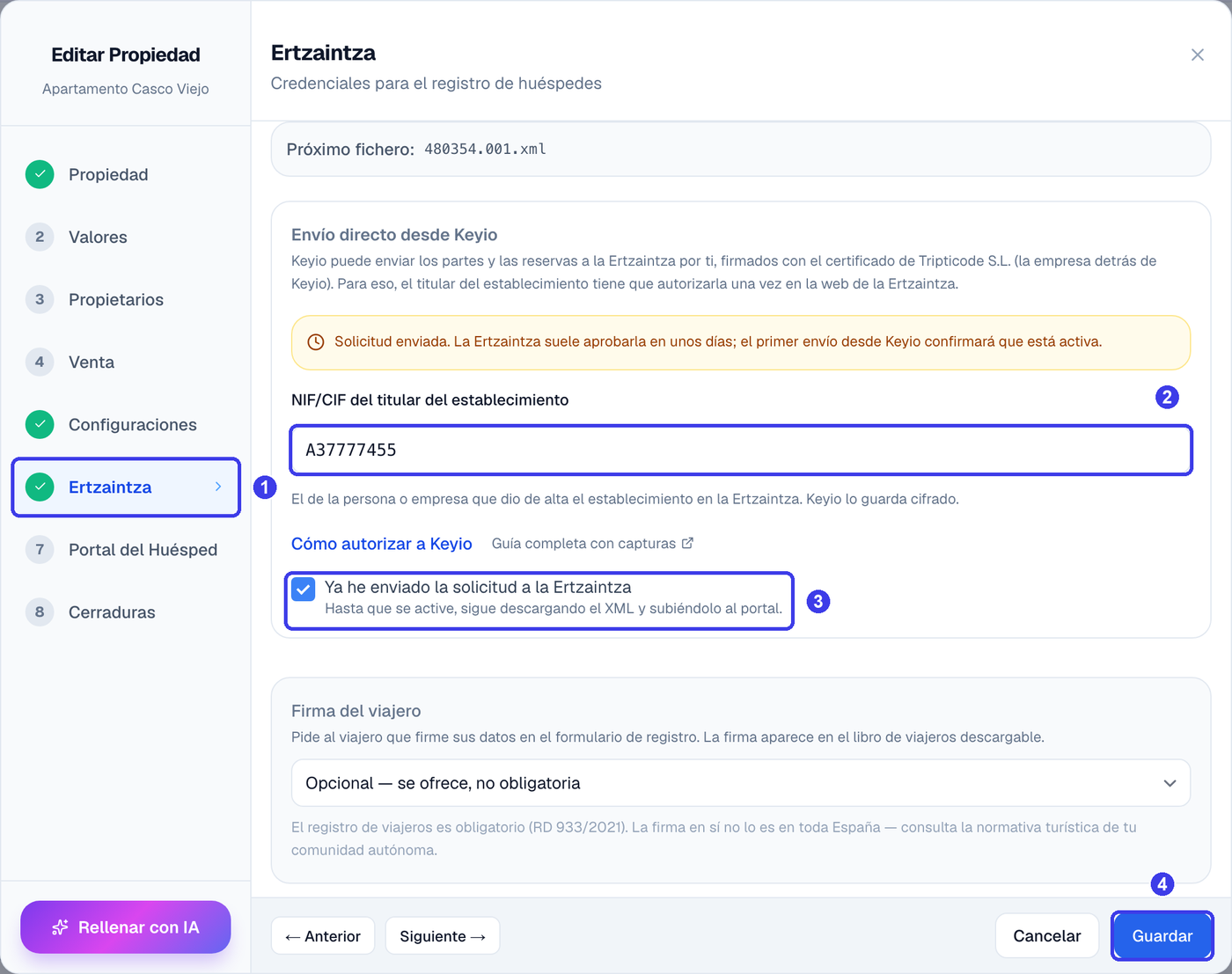
Open the property → Edit → Ertzaintza (the guest-registration step of a Basque property). Enter the Ertzaintza establishment code if it isn't there yet. Under "Direct sending from Keyio", enter the titular's NIF/CIF (the same one as in the form — Keyio stores it encrypted), tick "I have sent the request to the Ertzaintza" and save.
Step 3 — Send from each booking
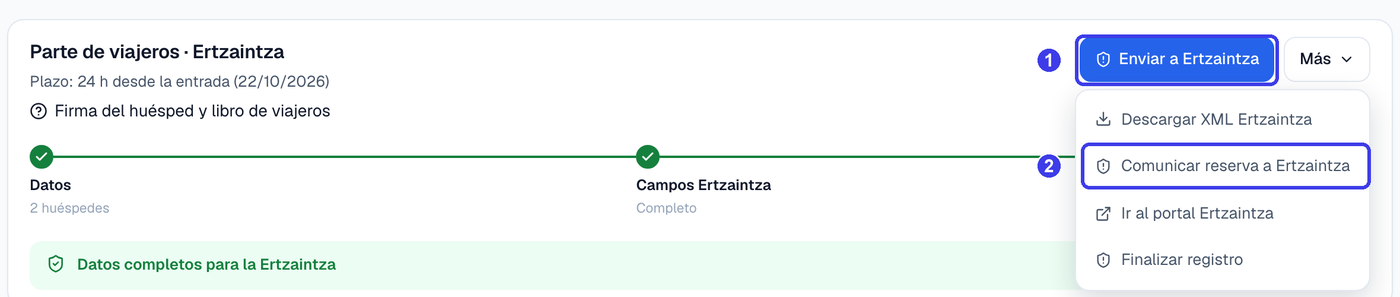
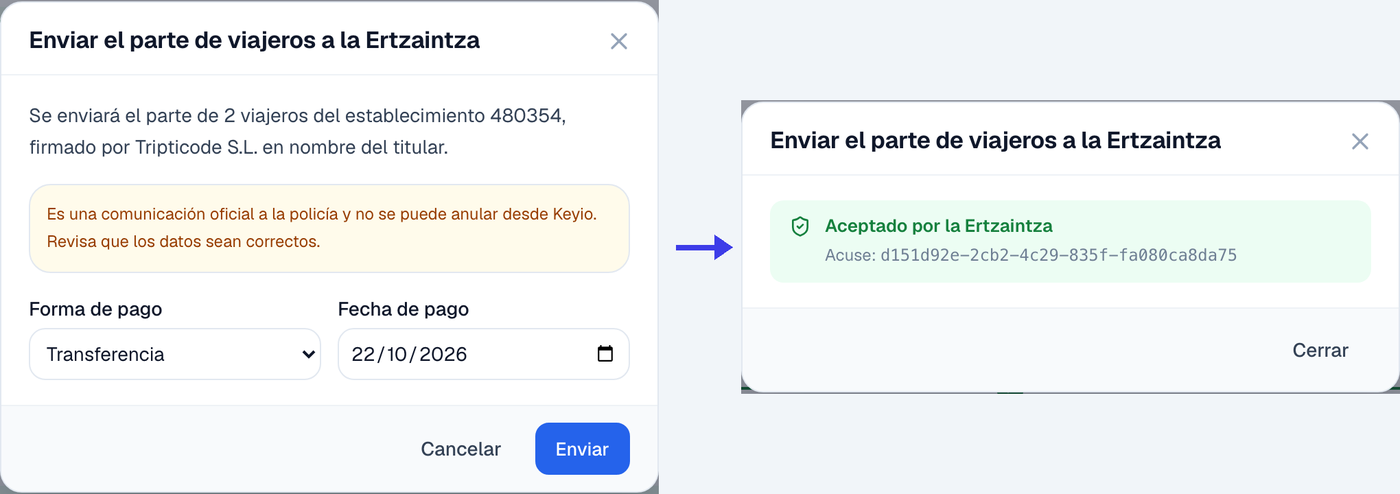
In the rental's Guests tab the main button becomes "Send to Ertzaintza" (the guest report), and the "More" menu next to it gains "Report booking to Ertzaintza" (the booking, which only needs the holder as a guest) and keeps "Download Ertzaintza XML". Keyio checks the data against the Ertzaintza's rules first and lists anything it would reject; the answer (accepted, duplicate, rejected with the reason per guest) is shown at once and kept on the rental.
Nobody tells Keyio when the Ertzaintza approves the authorisation: the first send confirms it. If it is not active yet, Keyio says so, marks the property in red and you keep the XML download for that booking. Try again in a few days.
The Ertzaintza web service has no cancellation or change operation. When a booking is cancelled or its dates change, report it on the Ertzaintza portal — Keyio reminds you in Action required.
Withdrawing access
File the same "Solicitud de usuarios" with Tipo de operación "Baja" and Tripticode's details, and remove the titular's tax ID from the property in Keyio.